How to
Obtain personal token
How to enable your system to use the APIs
A prerequisite for the process is that the VAT number associated with the system has the license that enables the use of the APIs.
Enabling the environment is allowed ONLY for Certified System Integrators. For details on the certification path click here
You need to open a ticket on MySupport in the dedicated queue, requesting the enablement of the API Gateway:
- Product Line: TS Enterprise Cloud
- Procedure: TSEnterprise Cloud
- Area: WebAPI and Customizations
- Module: WebAPI Development Support
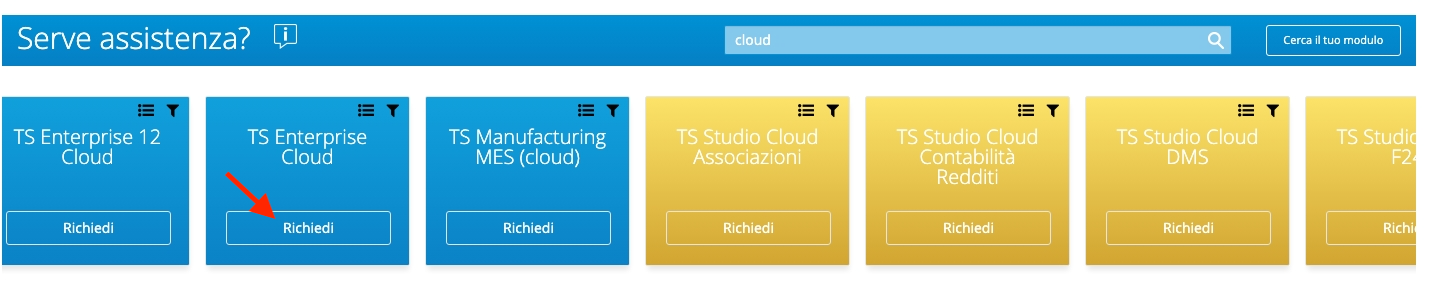
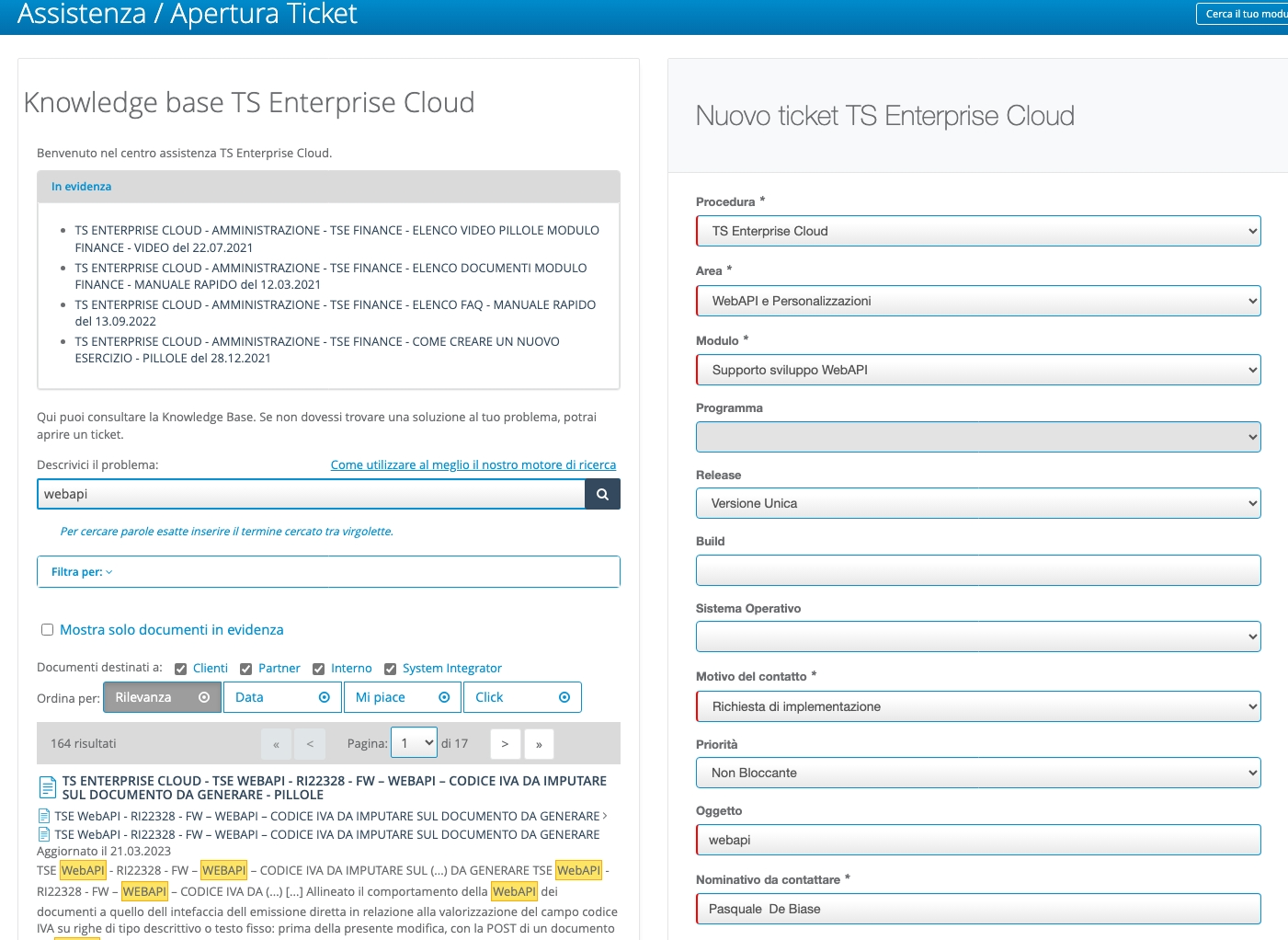
specifying:
- the URL of the Teamsystem Enterprise Cloud installation you want to enable
- an email address of the certified resource
At the end of the enabling process, the access URL to be used for the WebAPI will be specified.
Sample support response after enabling process:
| Parameter | Value |
|---|---|
| cid | webapixxxx1 |
| apigwt_base_url | https://apixxxx1.teamsystem.io |
The license code that enables the use of the APIs is 4520.
| MODULE | CODE | LICENSE | DESCRIPTION |
|---|---|---|---|
| 4520 | TE-4520 | 4520 | Web API |
| 55166 | S-TE-55166 | 4520 | Web API |
| 84006 | SAAS-TE-84006 | 4520 | Web API |
| 80057 | SAAS-TE-80057 | 4520 | Web API |
N.B.: The difference between the various codes is related to the presence of different price lists for individual procedures and/or different installations.
Generating the token from the graphical interface (persistent token)
With the new management mode, the token used to access the WebAPI is no longer distributed by the support team: it is generated autonomously from the graphical interface of the TeamSystem Enterprise application. A persistent token is a long-lived JWT credential (up to 18 months) that allows an external application developed by a System Integrator to communicate with the TSE WebAPI.
A Self Service Token can be generated from the side menu > Configuration and Services > Permissions and Security > Self Service Token.
The landing page lists the tokens already configured for the installation. The + button at the bottom right opens the creation form. Creating a new token:
- Step 1: from the Persistent tokens landing page, click the + button at the bottom right.
- Step 2: fill in the fields of the “New persistent token” form (see table below).
- Step 3: click “Generate New Token”: the system generates the JWT and displays it in clear text in the Token field.
- Step 4: copy the token immediately using the copy icon next to the field.
- Step 5: configure the copied token in the third-party application as a Bearer credential.
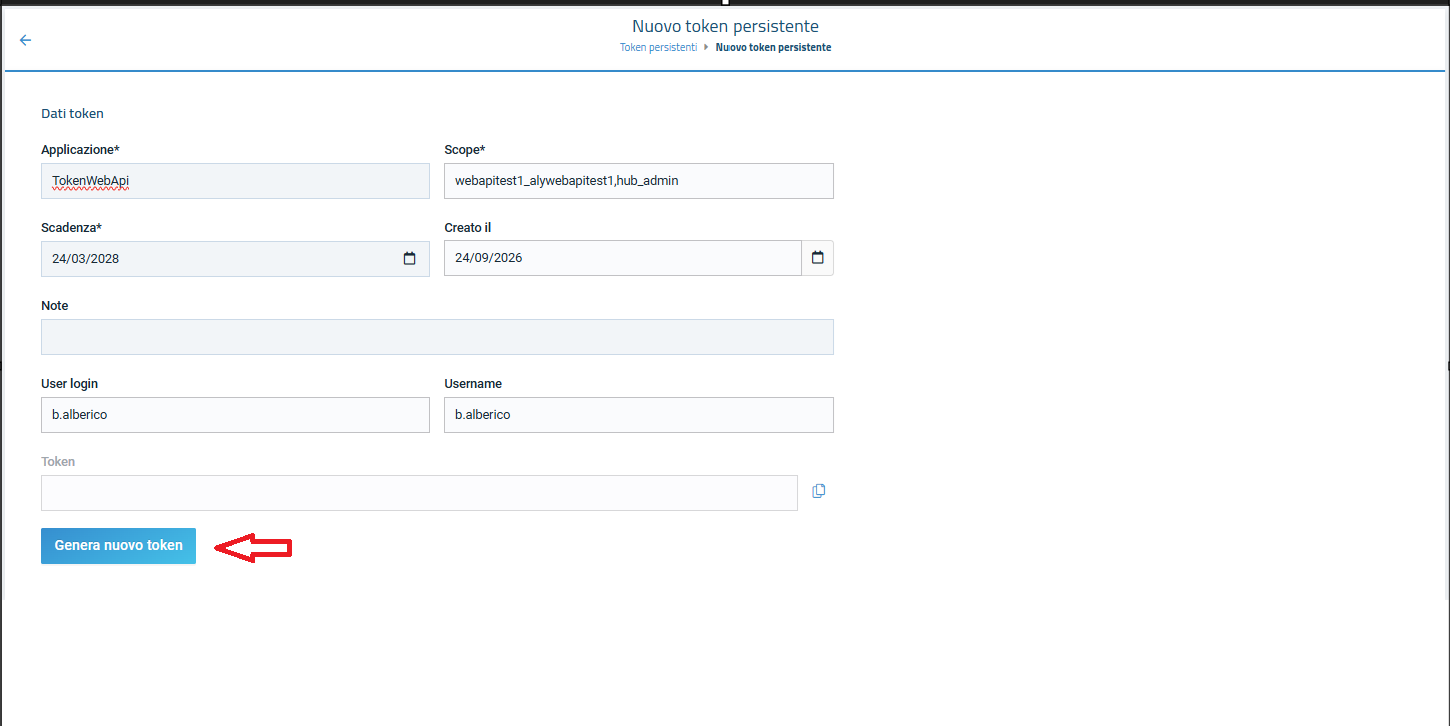
Generation is the only occasion on which the token value is visible in clear text. Once the creation form is closed, subsequent openings show only the first and last characters (e.g. ey***...***BWE). If the token is lost before being copied it cannot be recovered: a new one must be generated through the renewal (rotation) operation.
Effects of the operation: the new token is immediately available and visible in the list; it has no effect on pre-existing tokens or integrations; the operation is recorded in the audit log with date/time, creating user, application, scope and expiry date set.
Use personal token (api key)
Now you start to use api key to authenticate your requests.
You can use the api key in the header of your request as a Bearer Token.:
It is important that in the token section the API Key is preceded by the word "Bearer" followed by a space, for example:
{
  "token": "Bearer AbCdyJhbGciOiJ1NiIsInR5cCI6IkpXVCJ9.eyJzdWIiOiJ3ZWJhcGlhZG1pbiIsIndlYmFwaTphdXRoZW50aWNhdGlvbjpzY29wZSI6Imh1Yl9hZG1pbixjc2RlbW9fYWx5Y3NkZW1vIiwianRpIjoiNTRlOTJlY2MtN2I1OS00YWVjLThiOTMtYWVjYmQwNTk1ZmUzIiwiaWF0IjoxNjk0MDkwMzc5LCJpc3MiOiJBbHlDRVNydjJTcnZJc3N1ZXIiLCJhdWQiOiJBbHlDRVNydjJTcnZBdWRpZW5jZSJ9.QyQdBWnULnM9TF1eCuY7x8JIXxPuOUiyg1_YnxbjaCE"
}
- React
- C#
- cURL
function get_token(props) { ///Modify the following values received during activation const APIGWT_BASE_URL = "https://tsec-swa-tse10-sandbox.thankfulbeach-26fb04e7.westeurope.azurecontainerapps.io"; const SCOPE = "csdemo_alycsdemo"; const APIKEY = "XyJhbGciOiJIUzI1NiIsInR5cCI6IkpXVCJ9.eyJzdWIiOiJ3ZWJhcGlhZG1pbiIsIndlYmFwaTphdXRoZW50aWNhdGlvbjpzY29wZSI6Imh1Yl9hZG1pbixjc2RlbW9fYWx5Y3NkZW1vIiwianRpIjoiNTRlOTJlY2MtN2I1OS00YWVjLThiOTMtYWVjYmQwNTk1ZmUzIiwiaWF0IjoxNjk0MDkwMzc5LCJpc3MiOiJBbHlDRVNydjJTcnZJc3N1ZXIiLCJhdWQiOiJBbHlDRVNydjJTcnZBdWRpZW5jZSJ9.QyQdBWnULnM9TF1eCuY7x8JIXxPuOUiyg1_YnxbjaCE" const USERNAME = "admin_csdemo"; const GRANT_TYPE = "token"; const PASSWORD = ""; const BEARER_TOKEN = "Bearer " + APIKEY; const ALLOW_ORIGIN = "http://localhost:3000"; const CONTENT_TYPE = "application/x-www-form-urlencoded"; const WEBURL = APIGWT_BASE_URL + "/api/v1/auth/token"; const [token, setToken] = useState(null); const [result, setResult] = useState(''); const [error, setError] = useState(''); const [status, setStatus] = useState(null); const myHeaders = new Headers(); myHeaders.append("Content-Type", CONTENT_TYPE); myHeaders.append("Access-Control-Allow-Origin", ALLOW_ORIGIN); const urlencoded = new URLSearchParams(); urlencoded.append("username", USERNAME); urlencoded.append("grant_type", GRANT_TYPE); urlencoded.append("scope", SCOPE); urlencoded.append("token", BEARER_TOKEN); urlencoded.append("password", PASSWORD); const requestOptions = { method: "POST", headers: myHeaders, body: urlencoded, redirect: "follow" }; const authenticate = async () => { fetch(WEBURL, requestOptions) .then((response) => { setStatus(response.status); return response.text(); }) .then(result => setResult(result)) .catch(error => setError(error.toString())); }; const handleAuthResponse = () => { const hash = window.location.hash; if (hash) { const params = new URLSearchParams(hash.substring(1)); const accessToken = params.get('access_token'); if (accessToken) { setToken(accessToken); } } }; useEffect(() => { handleAuthResponse(); }, []); return ( <div> <button onClick={authenticate}>Get Token</button> <div> <code className="language-json" style={{ whiteSpace: 'pre-wrap' }}> {(() => { try { return JSON.stringify(JSON.parse(result), null, 2); } catch (e) { return result; } })()} </code> </div> <div> <pre> {(() => { try { return JSON.stringify(JSON.parse(error), null, 2); } catch (e) { return error; } })()} </pre> </div> <div> <pre>HTTP Status: {status}</pre> </div> </div> ); }
using System.Collections.Generic;
// No more boilerplate needed with top level statements (https://docs.microsoft.com/en-us/dotnet/core/tutorials/top-level-templates)
var client = new HttpClient();
var request = new HttpRequestMessage(HttpMethod.Post, "https://apicsdemo.teamsystem.io/api/v1/auth/token");
request.Headers.Add("Access-Control-Allow-Origin", "http://localhost:3000");
var collection = new List&lt;KeyValuePair<string, string&gt;>();
collection.Add(new("username", "admin_csdemo"));
collection.Add(new("grant_type", "token"));
collection.Add(new("scope", "csdemo_alycsdemo"));
collection.Add(new("token", "Bearer XyJhbGciOiJIUzI1NiIsInR5cCI6IkpXVCJ9.eyJzdWIiOiJ3ZWJhcGlhZG1pbiIsIndlYmFwaTphdXRoZW50aWNhdGlvbjpzY29wZSI6Imh1Yl9hZG1pbixjc2RlbW9fYWx5Y3NkZW1vIiwianRpIjoiNTRlOTJlY2MtN2I1OS00YWVjLThiOTMtYWVjYmQwNTk1ZmUzIiwiaWF0IjoxNjk0MDkwMzc5LCJpc3MiOiJBbHlDRVNydjJTcnZJc3N1ZXIiLCJhdWQiOiJBbHlDRVNydjJTcnZBdWRpZW5jZSJ9.QyQdBWnULnM9TF1eCuY7x8JIXxPuOUiyg1_YnxbjaCE"));
collection.Add(new("password", ""));
var content = new FormUrlEncodedContent(collection);
request.Content = content;
var response = await client.SendAsync(request);
response.EnsureSuccessStatusCode();
Console.WriteLine(await response.Content.ReadAsStringAsync());
  curl -X POST "https://apicsdemo.teamsystem.io/api/v1/auth/token" \
  -H "Content-Type: application/x-www-form-urlencoded" \
  -H "Access-Control-Allow-Origin: http://localhost:3000" \
  -d "username=admin_csdemo" \
  -d "grant_type=token" \
  -d "scope=csdemo_alycsdemo" \
  -d "token=Bearer XyJhbGciOiJIUzI1NiIsInR5cCI6IkpXVCJ9.eyJzdWIiOiJ3ZWJhcGlhZG1pbiIsIndlYmFwaTphdXRoZW50aWNhdGlvbjpzY29wZSI6Imh1Yl9hZG1pbixjc2RlbW9fYWx5Y3NkZW1vIiwianRpIjoiNTRlOTJlY2MtN2I1OS00YWVjLThiOTMtYWVjYmQwNTk1ZmUzIiwiaWF0IjoxNjk0MDkwMzc5LCJpc3MiOiJBbHlDRVNydjJTcnZJc3N1ZXIiLCJhdWQiOiJBbHlDRVNydjJTcnZBdWRpZW5jZSJ9.QyQdBWnULnM9TF1eCuY7x8JIXxPuOUiyg1_YnxbjaCE" \
  -d "password="